Where the digital magic happens
As former game developers, the founders of Gridly have firsthand experience with the challenges of content management and localization in the gaming industry.
Gridly's approach to becoming a cloud-based platform that provides a flexible and collaborative solution for managing and localizing digital content is influenced by understanding the pain points businesses face when it comes to managing multilingual content across a variety of platforms and devices.
Our mission is to make localization and content management more efficient, cost-effective, and scalable for businesses of all sizes.
At Gridly, we are dedicated to providing our users with exceptional customer service and support. Our team of experts is available around the clock to assist with any questions or issues that may arise, and we are committed to continually improving and evolving our platform to meet the changing needs of our users.
Key values of the Gridly team
- Builder ethos
- Grit
- Continuous improvement
- Friendliness
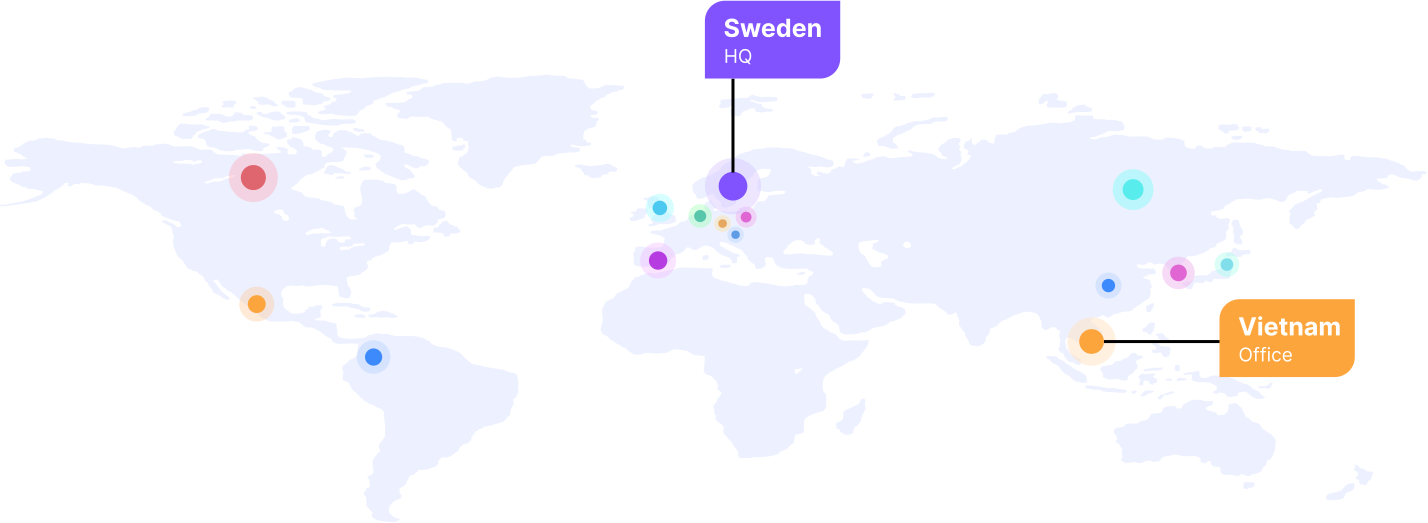
One product, global team
Here’s a glimpse at where our lovely people 💞 reside

Anna Albinsson | CEO
Anna Albinsson is an experienced commercial leader with an impressive track record of numerous executive positions within Marketing, Sales and Operations, as well as CEO. One of her many achievements is leading Bisnode on their transformation journey to becoming an AI company, and through the sale and later merger with Dun&Bradstreet. As a leader, Anna focuses on innovation, productivity and sustainable results.

Christoffer Nilsson | CPO
Christoffer Nilsson is a serial entrepreneur with over 25 years in the games industry. He led or has been a part of more than 20 commercial video game projects, including Atod, the first game console dev studio in Sweden, a technology company Keyfactor, and the dev studio for Eidos.

Mattias Wennerholm | CTO
Mattias has worked in many roles including senior software engineer, system architect, project manager, and chief technical director. Mattias’ multidiscipline background and extensive experience in both business systems and video games makes him the perfect choice to drive and develop our technology.

Adam Milnes | Head of CX
Adam Milnes is a seasoned CX and Customer Success expert with over a decade of experience leading and scaling customer-facing teams in the SaaS industry. He has successfully built and optimized Customer Experience functions across a variety of sectors, with a strong focus on operational efficiency, cross-functional collaboration, and delivering measurable customer impact. Known for his strategic mindset and people-first leadership, Adam drives innovation and continuous improvement to create high-performing teams and long-term business value.

Joanna Qvarnström | Head of Marketing
Joanna Qvarnström has vast and diverse experience from small startups and large enterprises, working across a variety of industries with a strong focus on high-tech B2B SaaS. She was previously the Head of Marketing at cybersecurity startup Debricked, taking the company from its first steps to being acquired by tech-giant OpenText. With a strong vision and broad skillset she will help pave Gridly’s way to greatness.




Interested in joining us?
Our success is directly tied to the success of our team. We are always looking for talented individuals who share our passion for innovation, collaboration, and customer service to join our team.
We strive to create a dynamic and supportive work environment that encourages creativity, learning, and growth. Our team members are encouraged to take ownership of their work, collaborate with their colleagues, and contribute to the ongoing evolution of our platform and services.
Committed to fostering a culture of diversity and inclusion, we welcome applicants from all backgrounds and experiences.
Are you passionate about localization, content management, or software development? Explore current job openings and submit your application today.
