1. Structured Content: The Foundation for Automation
When planning to automate localization processes, structured content serves as the critical foundation. Without clear content structure, the localization workflow becomes difficult to automate, leading to errors, inconsistent results, and ultimately frustration.

Well-organized content, with clear separation between text, formatting, and code, makes it significantly easier to extract translatable elements. By implementing structured content standards, localization teams can automate the extraction of translatable content without manual intervention, reducing errors and accelerating the entire localization workflow.
A structured approach should include clearly defining your content and metadata within a stable framework. Each content element—source text, translations, metadata, and related assets—should be stored systematically.
For instance, Gridly tackles this by:
- Grids: They resemble spreadsheets but enforce clear structure. Each column represents a specific data type—text, language, status, media files, numbers—ensuring consistency across localization workflows.
- Views: These serve as intelligent filters to batch content for targeted automation tasks, allowing you to isolate specific subsets of your content effortlessly.
- Stable IDs: Every piece of content and metadata has unique, stable IDs. These IDs ensure nothing breaks when content or structures change.
- Comprehensive metadata management: Allows storage of context, references, and multimedia assets alongside textual content, giving teams richer context.
2. Single Source of Truth: Keeping Automation Under Control
A common pitfall of workflow automation is losing visibility and control over processes. Therefore, establishing a single source of truth is essential for effective localization automation. This central repository ensures that all teams & tools access the same, up-to-date content, preventing version conflicts.

When content changes occur, having a single source of truth allows your automation workflows to instantly identify what needs translation, reducing duplicate work and ensuring consistency across all language versions. This approach creates a more reliable foundation for your automated localization workflows.
Gridly implements the following capabilities to ensure your automation remains reliable, transparent, and secure:
- Granular change tracking: Identifying who changed what and when, down to the smallest content elements. This includes the ability to compare versions across languages.
- Diff-checking: Especially during imports or integrations, diff-checking prevents accidental overwrites by highlighting changes, allowing informed decisions.
- Detailed version histories: Accessible from individual content cells up to entire accounts, ensuring visibility into the entire lifecycle of every localization asset.
- Backup and rollback capabilities: Quick recovery when mistakes happen, protecting your content and workflow from disruptions.
3. Automation Triggers: Initiating Processes Flexibly
Automation triggers are the catalysts that set your localization workflow in motion. Flexibility in initiating automation is critical because not every process should run automatically without context or oversight.
For example, a final push to production or sensitive approvals may always need human intervention to avoid costly errors or unintended changes. On the other hand, some tasks, like routine file transfers or updates from a development environment, can greatly benefit from full, instantaneous automation.
Without this flexibility, you risk automation doing the wrong thing at the wrong time, which can create more work instead of saving it.

Effective triggers should include:
- Manual triggers: involve a human touch to initiate automation. Essential for situations needing human oversight or when introducing new automations. This might include actions like pushing content updates after careful review.
- Automatic triggers: initiate an automation flow based on a specified event, no human touch needed. Ideal for repetitive, routine processes, such as automated QA checks when content status changes.
With Gridly, triggers are configurable and diverse, capable of responding to various conditions such as cell changes (values, statuses), new content creation, deletions, comments, or even ticketing activities. This flexibility lets you adapt automation precisely to your operational needs.
Want to take your workflows further? See how automation helps localization teams work faster and smarter.
4. Automation Actions: Executing Core Tasks Efficiently
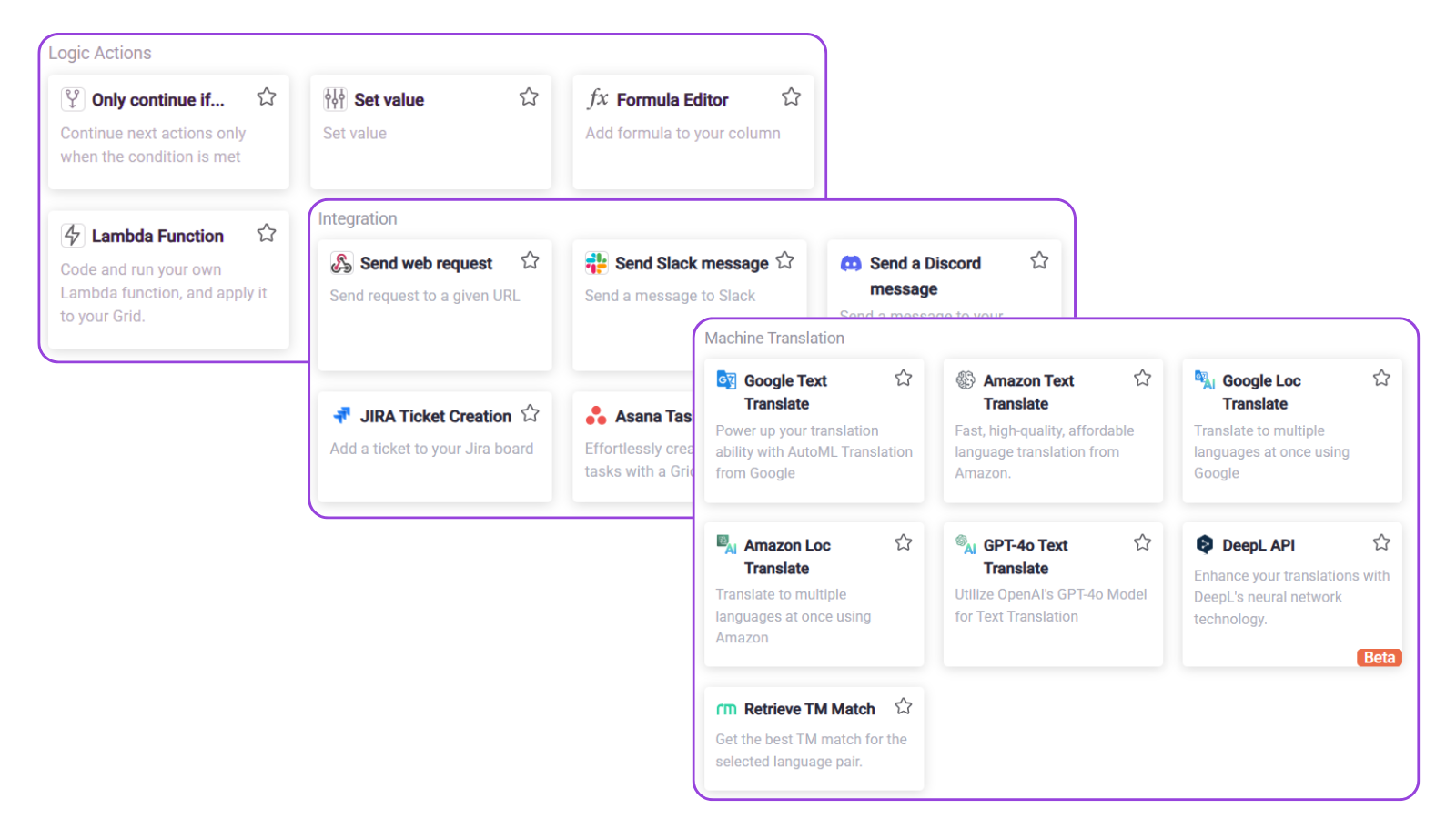
The actions themselves—the tasks automation performs—form the core of any automated workflow. These may include content extraction, translation memory leveraging, machine translation application, quality checks, file conversions, and others.

Properly configured automation actions dramatically reduce manual effort in the localization process while maintaining quality standards. Important capabilities include:
- Pre-built actions: Gridly, for example, currently offers 20 ready-made actions covering most common localization tasks, ensuring you don’t need to reinvent the wheel each time. From translation to notifications or integrations with tools like Slack or Jira, you can view the full list here.
- Configurability: Actions need to be adaptable to fit various tasks, so it can be applied in the specific context or meet a specific business need.
- Cross-batch usability: Actions should be reusable and scalable across multiple content batches to streamline your workflows efficiently.
Examples of automation tools in Gridly
5. Automation Workflows: Bringing Everything Together
The real power of automation emerges when triggers and actions come together into coherent, repeatable workflows. Effective automation workflows map clearly-defined triggers to specific actions, conditionally running and chaining processes together seamlessly.

Ideal workflow management should offer:
- Visual workflow design: Tools to visually map and understand automation paths, simplifying complex processes and helping localization teams stay aligned.
- Templates: Pre-built templates or custom ones created within your organization streamline deployment of automation solutions, enabling quick setup and adoption.
- Monitoring and tracking: Comprehensive logging of automation processes helps localization managers quickly identify issues, review outcomes, and continuously improve workflows.
Without a comprehensive solution for designing, managing, and monitoring workflows, automation can end up consuming resources and slowing down delivery instead of saving costs and improving accuracy.
Teams like Belka Games leverage Gridly’s automation capabilities to build powerful localization pipelines. Their workflows run largely independently, with manual intervention only when strategic oversight is necessary, dramatically reducing manual effort and boosting reliability.
Automation Done Right
Automation in localization, when built thoughtfully upon structured content, clear control, flexible triggers, robust actions, and comprehensive workflows, can transform productivity and consistency. The goal is not to automate blindly but to automate strategically, intelligently, and transparently.
By focusing on these core building blocks, localization managers can deliver better results faster and with fewer headaches—making automation a strategic advantage rather than a source of frustration.
With the right tools and processes, localization automation isn’t just possible; it’s a powerful asset you can’t afford to overlook.
Frequently asked questions
What is localization automation?
Localization automation is the use of configured triggers, actions, and workflows to perform repetitive localization tasks — such as content extraction, machine translation, quality checks, and file transfers — without manual intervention. Rather than replacing human judgment, well-designed automation handles predictable, high-volume tasks so localization teams can focus their time on work that requires expertise: cultural adaptation, strategic decisions, and final approvals.
Why does localization automation fail without structured content?
Automation systems process content by following rules and patterns. When content mixes translatable text, formatting code, and metadata without clear separation, automated tools cannot reliably identify what needs translation, where strings begin and end, or what contextual information belongs to each element. The result is extraction errors, broken formatting, and inconsistent output that creates more manual cleanup than it saves. Structured content — with each element stored in a defined, stable format with unique IDs — gives automation a predictable foundation to work from.
What is a single source of truth in localization, and why does it matter for automation?
A single source of truth is a central content repository that all teams and tools read from and write to, ensuring everyone is always working with the same version of every string. In automated workflows, the absence of a single source of truth means different systems may act on different versions of the same content simultaneously — resulting in duplicate translations, overwritten edits, or outdated strings reaching production. With a single source of truth in place, automation can reliably detect what has changed, what needs translation, and what is already approved, without human coordination at each step.
What is the difference between manual and automatic automation triggers in localization?
Manual triggers require a human to initiate an automation — for example, clicking a button to push a reviewed batch to translators or to deploy approved translations to production. They are best suited for steps that require judgment or carry significant consequences if run at the wrong time. Automatic triggers fire in response to a defined event, such as a status change, a new string being added, or a comment being posted, with no human action needed. Routine, repetitive steps like QA checks on newly submitted translations or notifications to reviewers are well suited to automatic triggers. Effective localization automation uses both types strategically rather than defaulting to one.
What tasks can automation actions handle in a localization workflow?
Automation actions cover the core operational steps of a localization pipeline: extracting translatable content, applying translation memory matches, running machine translation, performing automated quality checks, converting file formats, updating content statuses, sending notifications to team members, and integrating with external tools such as project management or communication platforms. The key requirements for useful automation actions are that they are configurable to fit specific content types and business rules, and reusable across multiple content batches so teams do not have to rebuild logic for every project.
Which localization tasks should always involve human oversight?
Final approvals before production deployment, culturally sensitive content such as marketing copy and character dialogue, and any step where an error would be costly or difficult to reverse should involve human oversight. Automation works best on tasks with clear rules and predictable inputs — technical QA checks, status updates, routine file transfers, and machine translation drafts. The goal of localization automation is not to remove humans from the process but to reserve human attention for decisions that genuinely require it.
How do automation workflows differ from individual triggers and actions?
A trigger initiates an automation and an action executes a task, but a workflow is what connects them into a coherent, repeatable sequence. Workflows define the conditions under which triggers fire, the order in which actions run, and any branching logic that routes content differently based on its type, status, or metadata. Without workflow-level design, individual triggers and actions operate in isolation and cannot handle multi-step processes reliably. Visual workflow design tools, pre-built templates, and monitoring logs are what allow localization teams to manage complex pipelines at scale rather than stitching together individual automations ad hoc.
How do you prevent automation from introducing errors in localization workflows?
The main safeguards are diff-checking on imports, granular version histories, automated QA validation at submission, and rollback capabilities. Diff-checking prevents automated imports from silently overwriting approved human edits. Version histories make it possible to audit every change and recover a previous state if something goes wrong. Automated QA catches technical errors — missing tags, broken placeholders, formatting violations — before they advance through the pipeline. Rollback capabilities provide a safety net when a larger issue requires restoring content to a known-good state.
What metrics should localization teams track to measure automation performance?
The most useful metrics are human edit rate on machine-translated or automatically processed content (a proxy for automation quality), end-to-end cycle time from source string creation to approved translation, error rate at each workflow stage, and the proportion of content that completes the pipeline without manual intervention. Tracking these over time reveals where automation is delivering efficiency gains and where bottlenecks or quality issues require prompt engineering improvements, rule adjustments, or additional human review gates.
How does Gridly implement the five building blocks of localization automation?
Gridly addresses each building block directly within a single platform. Structured content is enforced through Grids with defined column types, stable IDs, and metadata management alongside text. A single source of truth is maintained through granular change tracking, diff-checking on imports, detailed version histories, and backup and rollback capabilities. Automation triggers are configurable across both manual and automatic modes, responding to cell value changes, status updates, new content creation, comments, and ticketing events. Automation actions include over 20 pre-built options covering translation, QA, notifications, and integrations with tools like Slack and Jira. Workflows are designed visually, supported by pre-built templates, and monitored through comprehensive logging — giving localization managers full visibility into pipeline performance and the ability to continuously improve over time.