What’s covered
- What tools and file formats do translation vendors actually use?
- Why do manual file handoffs break game localization?
- Manual file handoff vs connected workflow: a direct comparison
- Three levels of studio-vendor workflow maturity
- How Playrix runs a connected workflow at live ops speed
- Frequently asked questions
- Next steps
Every game studio has its own content pipeline. Every translation vendor has their own TMS setup. The handoff between the two sides – the moment when studio content becomes a vendor’s file – is where localization workflows most commonly break down, regardless of team size or budget.
In a recent Gridly webinar, manual file import and export was the most common studio-vendor workflow among attendees, ahead of even internally built API setups. “My money was on that as well,” said Santiago Cisneros, solution engineer at memoQ, after seeing the results. The fact that most studios are still doing it this way is not surprising. It works well enough at the start. It breaks badly once a game ships live content on a continuous cycle.
This post covers what translation vendors actually use, why file-based handoffs break as games scale, and three levels of studio-vendor workflow maturity – from stable file exchange to full automation.
What tools and file formats do translation vendors actually use?
The short answer: vendors work in professional CAT and TMS tools – memoQ, Trados Studio, Smartcat, and others – and most are flexible about what you send them. XLIFF and CSV are the de facto standard exchange formats, with Excel still widely accepted for smaller projects.
Here is what each format actually means in practice:
- XLIFF – an XML-based standard designed for translation exchange. Carries segmentation, metadata, and inline markup. Best when you need to preserve tag structure going into the vendor's tool.
- CSV – simple, universal, and accepted by every vendor without exception. Lacks metadata natively but is trivially stable – a CSV filter set up once in a TMS tool never breaks.
- Excel (.xlsx) – familiar and widely accepted for small projects. Fragile at scale because column structures drift, formulas get broken, and the file itself becomes unwieldy once a game has millions of words.
- Engine-native formats (JSON, PO, string tables, .strings files) – these are usually converted by the vendor using import filters or scripts. The conversion adds a failure point every time the format changes.
The format question is the easier half of the problem. The harder half is keeping that export consistent as the game changes – which is exactly where manual handoffs start to break down.
Why do manual file handoffs break game localization?
Files are static. Games are not. Every source change after an export creates divergence between what the studio has and what the vendor is translating. A master spreadsheet plus manual export works for a small launch build. It breaks down as soon as studios move to agile game localization – shipping content continuously rather than in a single batch.
What breaks on the studio side
- Source strings change during the translation cycle. The file already sent to the vendor is now out of date, and there is no clean way to sync just the changed strings.
- Multiple vendors multiply the problem. Sending an update to three vendors, each with their own file structure and naming conventions, is a coordination problem that consumes localization PM time every cycle.
- Translations come back broken. Tags get translated, variables are moved, formatting characters are removed – errors that only surface when developers pull files into a build.
- LQA fixes do not flow back. Changes made during review stay in a spreadsheet or email thread and never update the vendor's translation memory, so the next batch goes out with the same issues uncorrected.
- Context does not travel with the file. In a spreadsheet, internal notes and content live in the same columns. You either share everything – including comments you did not intend to send – or strip it out and leave the vendor guessing.
What breaks on the vendor side
- Big files are slow. Every source update means reimporting the whole file, which affects load times, sync performance, and the ability to do simultaneous translation and review.
- Changing file formats break import filters. When the studio changes export formats – a new column, a different delimiter, a renamed header – the filter fails and vendors end up maintaining scripts to patch the gap.
- LQA edits rarely make it back into the TM. Without a feedback loop between studio corrections and vendor resources, the next batch pre-translates using outdated material and the same issues recur.
Manual file handoff vs connected workflow: a direct comparison
The problems above compound each other. Here is what the same steps look like when the studio-vendor connection is direct rather than file-based.
| Step | Manual file handoff | Connected workflow |
|---|---|---|
| Sending content | Export, email or SharePoint, version confusion | Filtered view pushed or exported directly to the vendor |
| Source changes mid-cycle | Re-export and re-send the full file | Only out-of-date strings flagged and re-sent |
| Context for translators | Mixed into cells, or stripped out entirely | Dedicated context columns, screenshots per string, internal notes filtered out on export |
| File formats | Import filters break when formats change | Stable CSV exchange, filter set up once |
| Delivery | Manual import, mapping done by hand | Sync via record IDs, auto-committed or reviewed |
| Visibility | Email threads and version-named files | Full string history and diffs in one place |
The right-hand column is not a single product – it describes an outcome. There are three different ways to get there, depending on your vendor’s setup and your team’s technical resources.
Three levels of studio-vendor workflow maturity
There is no single plugin that works for every vendor, and you do not have to start at the top. Each level builds on the previous one – start where your team and vendor setup allow, and move up as the workflow matures.
1. Stable file exchange from a source of truth
This is the baseline approach and it works with every vendor regardless of what tools they use.
The studio keeps all content in a single source of truth – a dedicated localization platform or CMS – with change tracking per string and per language. When content needs to go to a vendor, a view or filter reduces it to exactly what needs translation: only strings that are out of date, unset, or tagged for that vendor. Internal columns, developer notes, and DNT strings are excluded, so they never appear in the export.
The export goes out as a consistent format – typically CSV. Because the format never changes, the vendor sets up their import filter once and never has to touch it again.
This approach requires no integration with the vendor’s TMS. It is the floor, not the ceiling – but it already solves the most common failure modes: stale files, format drift, and context lost in transit.
2. Direct TMS integration
When a vendor standardizes on a TMS that supports a direct connection to your localization platform, the file handoff can be removed entirely. The example here uses a Gridly-memoQ connection; the same principle applies to other platform-TMS integrations.
The workflow looks like this:
- Content lives in a source of truth with change tracking. Source updates immediately flag the related translations as out of date.
- A filtered view defines exactly what gets sent – only out-of-date or unset strings, in the languages needed. What you see is what gets pushed. Nothing else.
- A push creates or updates a project in the vendor's TMS. Record IDs map content back precisely. Per-string comments transfer as translator notes. Pushes can be scheduled.
- The vendor works in their TMS exactly as they always have. Translation memories, term bases, QA checks, reviewer assignments – none of it changes. Nothing changes for the linguist. The integration lives entirely on the studio side.
- On delivery, translations sync back automatically, either auto-committed or held for a manual review step with a diff of exactly what is changing.
- The game team pulls approved content into the engine via API or engine connectors.
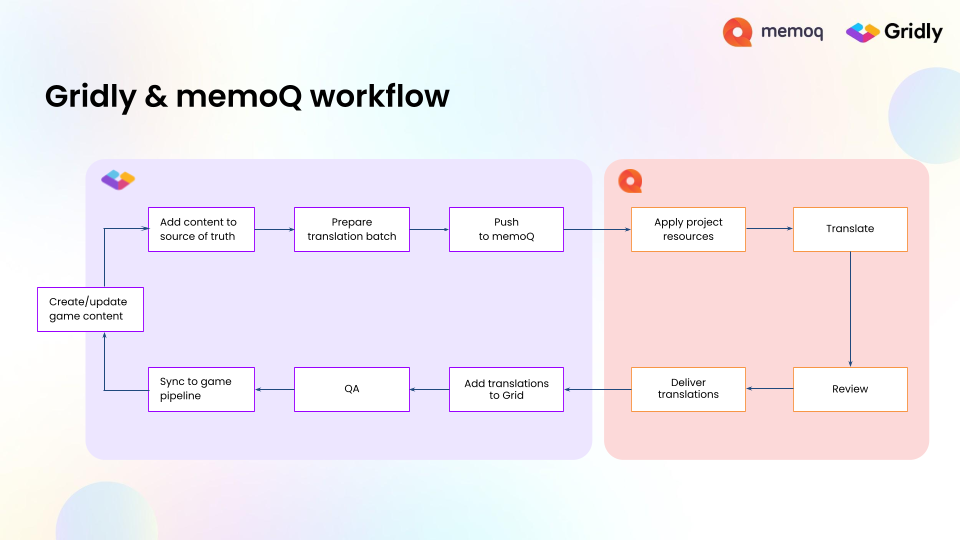
The connected Gridly-memoQ workflow with no manual file handoff between them.
Because the source of truth always sends a stable format into the TMS, the vendor’s import filter is set up once and never breaks – regardless of how the game’s content structure evolves.
One practical consideration at this level is vendor access. The standard setup requires the studio to hold the vendor’s TMS API key and manage the connection. That works with one vendor, but gets complicated with multiple vendors or NDA requirements. More mature platform setups let vendors configure their own TMS connection inside a restricted environment – scoped to a specific project and content set – so the studio never handles vendor credentials and the vendor never sees content outside their scope.
3. API and engine connectors for custom pipelines
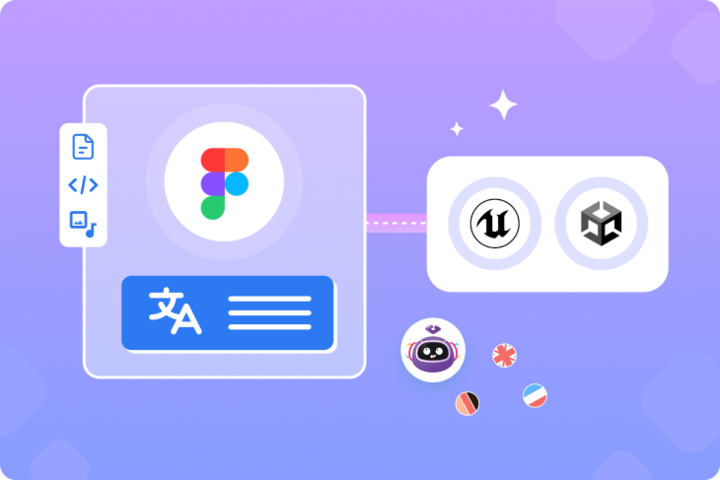
For studios with development resources, a localization platform API enables fully automated pipelines. Content flows from the engine into the platform via API, gets processed and sent to vendors, and comes back through the same pipeline without any manual steps.
Dedicated engine connectors – for Unity and Unreal Engine, for example – let developers automate imports and exports directly from the command line, making localization part of the build process rather than a separate step alongside it.
How Playrix runs a connected workflow at live ops speed
Playrix is one of the world’s leading mobile game companies, known for global hits such as Gardenscapes, Homescapes, Township, and Fishdom. To keep millions of players engaged, its teams release new content constantly across multiple live games.
Before Gridly, the localization team at Playrix used Google Sheets to manage game content and memoQ for translation. Keeping spreadsheets in the right structure was problematic for developers when pulling text into their builds. The localization team had to move content between spreadsheets and memoQ manually, so they built scripts to avoid copy-pasting. Those scripts required additional technical support – sometimes they would not work, sometimes they would do something unexpected, and the team would have to investigate what went wrong and fix it.
Today, how Playrix saves 130+ hours a year on live ops localization tells the full story of what changed. The short version: content starts in Gridly and moves through AI translation, to translators in memoQ, and back to developers without manual exports, copy-pasting, or scripts that break at inconvenient moments. The team estimates that with Gridly they save around two hours per release cycle for each game, just by automating manual processes. With each of Playrix’s four major titles on a three-week cycle, that adds up to over 130 hours recovered per year. Removing manual handoffs and improving visibility also produced a 30% improvement in turnaround time on localization updates.
The Playrix workflow is a live ops workflow – new content every three weeks, four titles running in parallel, no room for a process that breaks when a spreadsheet column moves. It is the clearest example of what a connected studio-vendor pipeline needs to sustain.
Frequently asked questions
What file format should I send to game translators? CSV or XLIFF are accepted by virtually all professional translation vendors. CSV is the most stable choice – the format never changes, so the vendor sets up their import filter once. XLIFF is better when you need to carry markup and metadata into the vendor’s tool. Excel works for small projects but becomes fragile as content volume grows.
How do you manage localization across multiple translation vendors? The core problem with multiple vendors is keeping them in sync when source content changes. Each vendor works from their own copy of the file, so any update requires re-exporting and re-sending to every vendor separately – and there is no guarantee they are all working from the same version. A source-of-truth approach solves this by making the studio’s platform the single record, with each vendor connected to it independently. Updates go out to all vendors from the same source, and deliveries come back into the same place.
How do live service games handle continuous localization updates? Live service games require localization to run in parallel with development rather than as a downstream step. The practical requirement is a workflow that can send only changed strings – not the full file – to vendors on a regular cadence, receive translations back without manual imports, and track which strings are pending, translated, or approved at any point in the cycle. Studios that manage this well treat localization as part of the release pipeline, not a separate handoff that happens before launch.
How do you connect game engine localization to a TMS? The cleanest approach is a localization platform that sits between the engine and the TMS. Content moves from the engine into the platform via API or dedicated connectors (Unity and Unreal Engine both have these), and the platform handles the handoff to the vendor. Developers can automate imports and exports from the command line, making localization part of the game localization process rather than a separate manual step.
What is the difference between a TMS and a localization platform in game development? A TMS (translation management system) is the vendor’s tool – it manages translation memories, term bases, linguist assignments, and QA. A localization platform is the studio’s tool – it manages source content, tracks changes across languages, and connects to the engine and vendors. They serve different sides of the workflow; the integration between them is what removes the manual file handoff.
Next steps
For studios shipping content once, a manual handoff is survivable. For studios shipping content continuously – every few weeks, across multiple titles, into multiple languages – it is not. The workflow either keeps up with the game or it becomes the bottleneck. That is the real reason to fix it.
To see the full studio-vendor workflow in action – including a live demo of the memoQ integration – watch the game localization without manual file handoffs webinar. When you are ready to go further, schedule a demo with the Gridly team to see how it applies to your own setup.
Beside Playrix, other top game studios like tinyBuild have also achived success in cutting down manual file handoffs with Gridly. Read the full case study.
Author

Quang Pham
Quang has spent the last 5 years as a UX and technical writer, working across both B2C and B2B applications in global markets. His experience translating complex features into clear, user-friendly content has given him a deep appreciation for how localization impacts product success.
When he's not writing, you'll likely find him watching Arsenal matches or cooking.